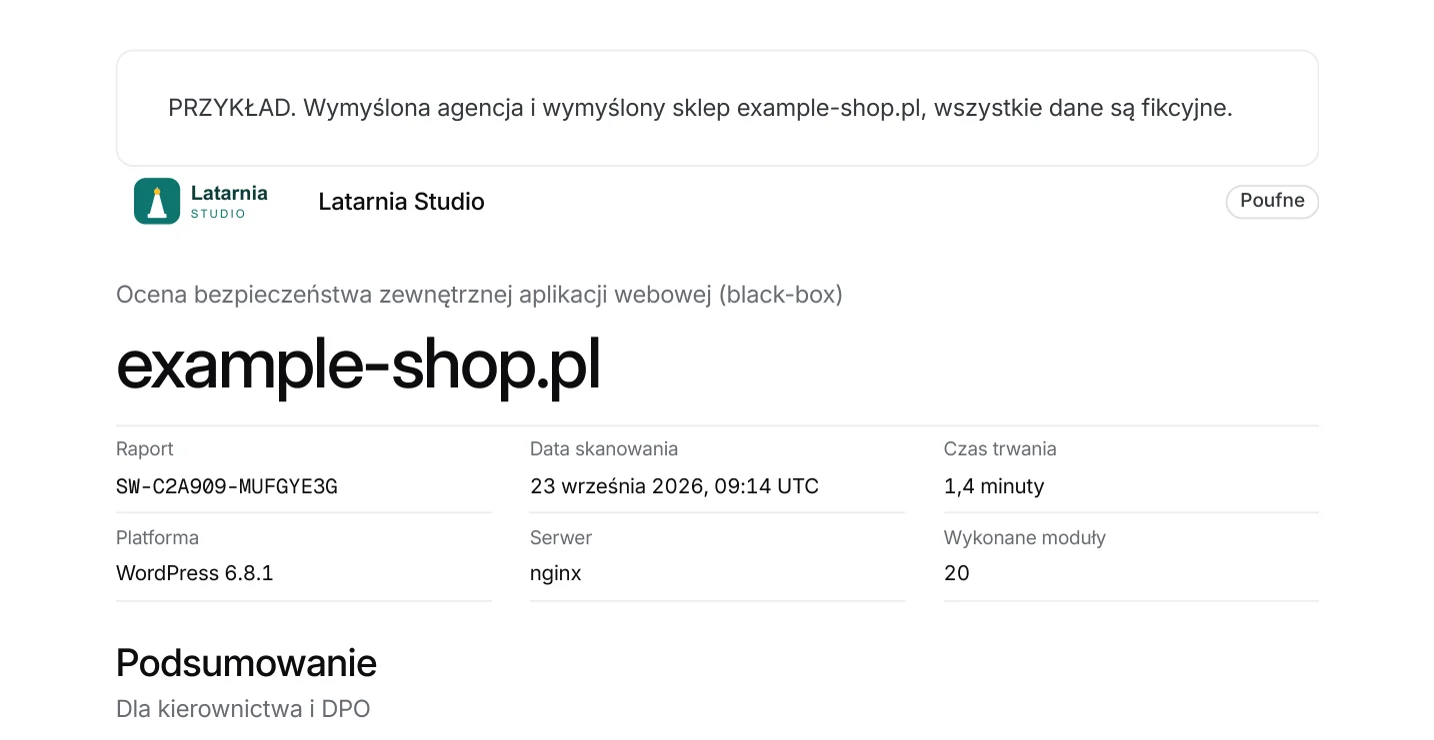
A security report with your agency logo. For every client site.
A scan from the outside, with no plugin and no access to the admin panel. A report for the client, a list of work to quote for you. $29 a month for all your client sites.
When you click, you create an account and enter a card in Stripe checkout. The trial needs a card. The first payment, $29, is taken after 7 days. Cancel before then and you pay nothing.
Next to the tools you already have.
Update and backup plugins look after a site from the inside. ShieldWave looks from the outside, the way a bot hunting for holes does: at the email on the client’s domain, forgotten subdomains, backup files left in view and the headers. It also checks a site that is not on WordPress, and one you do not have access to yet.
When does it help?
Before you take over a site
A client brings a site from the previous contractor. You check it before you quote, still without passwords, and you know what you are taking on.
Every month of a care plan
A report under your brand shows the client what they are paying for. Whatever the scan finds goes on the list of work for the next month.
After an incident at a client
Spam from the client’s domain, a warning in Google, a security incident. The report shows what can be seen from the outside and puts it in order of importance.
One report, two readers
- The client
- A rating of the site, every problem explained without jargon, and a plan of fixes starting with the most important.
- You
- Every finding with its address, evidence and an estimated time of work. From that you build a quote or a task list for a developer.
- Your brand
- Your agency’s name, logo and email in the report header.
What you have on the first day
1. An account and the Enterprise plan
You create an account and confirm the plan in Stripe checkout. From that moment you have the full plan for the 7-day trial, with no limit on sites.
2. Your logo in the reports
In the settings, under “Branding for reports”, you upload a logo (PNG, JPEG or SVG) and enter your agency’s name and contact details.
3. The first report for a client
You enter the address of a client’s site and get a report with your logo, in HTML and PDF, with a list of work to quote. Without a domain confirmation the scan runs a shorter set of tests that only read the site. The full set starts once the domain is confirmed with a DNS record, a file or a tag on the site.
One price for all your client sites
$29 a month
No limit on sites. $290 a year. VAT included where it applies.
- Reports with your agency’s logo and details
- No limit on sites or scans
- Up to 10 people on the team
- 7-day trial
Only a few sites and no need for your own logo? Pro at $12 a month covers 25 sites. See pricing
Questions before you start
Can I scan my clients’ sites?
Yes, your own and your clients’, with their consent. The tests are non-invasive: they change nothing on the site and need no passwords and no hosting access.
The client will see problems. Won’t they think we do bad work?
A report with your logo shows that the problem was found thanks to you. Every finding becomes a line in the quote for your work straight away.
What if the scan gets it wrong?
Every finding comes with evidence and a confidence level, so a developer can check it before you show anything to the client. The report also says plainly what it did not check.
I have only a few sites. Is it worth it?
Pro at $12 a month covers 25 sites, only without your logo. Enterprise makes sense when the report should go out under your brand.
What happens after the 7-day trial?
We charge $29 to the card you gave when the trial started and the monthly subscription begins, with an invoice. Cancel before the trial ends and you pay nothing.
Is there a demo or a sales call?
No. There is a 7-day trial, a sample report in PDF and an answer to every question by email.
Start with one client’s site.
Create an account, upload your logo and check the site you know best. You will see whether the report tells the truth about it before you show it to a client. For 7 days you pay nothing.